Dialogue / Character selection widgets
A major improvement for the articy importer plugin for Unreal Engine was introducing the articy object picker. Previously, all imported articy objects existed as data assets with unique IDs as their asset names, and referencing a specific entity was only possible by using that unique ID to look for the right data asset, which is impractical.
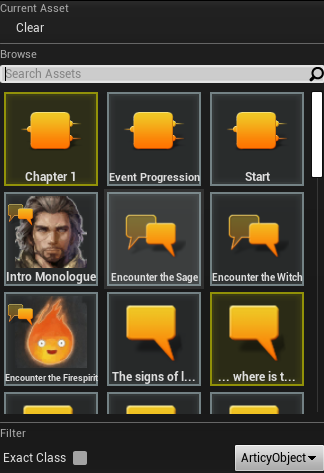
The solution is called the articy object picker and consists of multiple central parts that enhance the workflow.
Articy Object Selection
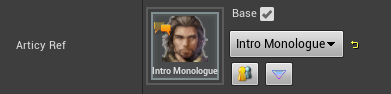
A widget featuring preview icons, type icons, referencing options for copies of an object, advanced tooltips, an articy button that opens the corresponding object within the external program, and an extension point so other modules can register their own buttons and widgets for different use cases without modifying plugin code.
This widget was primarily intended for use in details panels, but was reiterated upon to be as modular and reusable as possible, for use in, for example, blueprint pins.
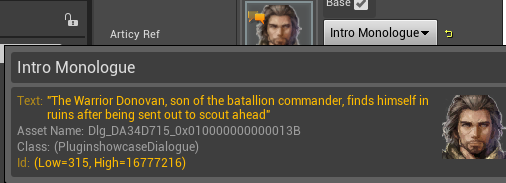
Advanced tooltips are necessary to display relevant information and let the user know what object exactly is selected. Important information is highlighted to draw attention.
A customer was using the extension point to register a “quest” button that would check a quest ID defined within articy against a quest ID within a datatable. If found, the data table opens up and selects the relevant quest row. This makes it easy to catch spelling mismatches and saves the user a lot of time navigating data tables, all without modifying plugin code. Customizability allows this button to only appear on selected objects with a quest attribute, so different widgets can be registered for different types without cluttering the UI.
The widget is additionally implemented on pins of the customized struct to allow for literal values outside of the details panel, and supports copy & paste properly. This helps with prototyping and gives the programmer, level designer or scripter the power to gather information about a graph’s logic at a glance rather than relying on indirection.
Articy Object Picker
- The object picker features a tile view of the same tiles used in the widget to display its selected object, so the tooltips work by default.
- The search function parses for things like entity type as well as content, so dialogue lines can be found by typing the text contained within the object rather than just its asset name or ID.
- A class filter can be used to find only content of specified types, and an “Exact class” checkbox disallows inherited types from appearing.
- To enhance the workflow between engineers and designers, C++ meta tags are supported to restrict the class filter to a specific class hierarchy. This makes sense where only characters are expected, or only dialogue elements but not individual dialogue lines.
- The picker was written to be reusable across the board. One experiment was adding it to Sequencer via custom tracks.