Async Blueprint nodes for smooth transitions
A common way to handle weapons is to attach them to different sockets of your skeleton. Drawing and sheathing your favorite gang buster is handled by switching the attachment thereof at a specific frame in your animations. Unless you have pixel-perfect animations, there will be a visible snap.
The idea
There are three (or more) ways to handle this:
- Change your animations, per character! Unfeasible for most developers if reusability is a concern and different proportions are a thing.
- Use inverse kinematics to tweak your animations procedurally! Feasible, but a lot of work to fine-tune the IK alpha for every animation.
- Just lerp the sword to where it should be! As long as the original and target transforms are close to each other, a lerp does wonders.
I decided to go for the third option, lerping. Lerping means interpolating linearly between two values (here: transforms). We are basically animating the sword transform over a short period of time to transition from the original transform to the target.
This is where async Blueprint nodes come in. You can write these in C++ only, and they allow you to encapsulate time sensitive functionality without relying on timelines in actors, event tick or Blueprint timers. There will still be some of that internally, but it’s hidden from the Blueprint layer, making it nice and tidy.
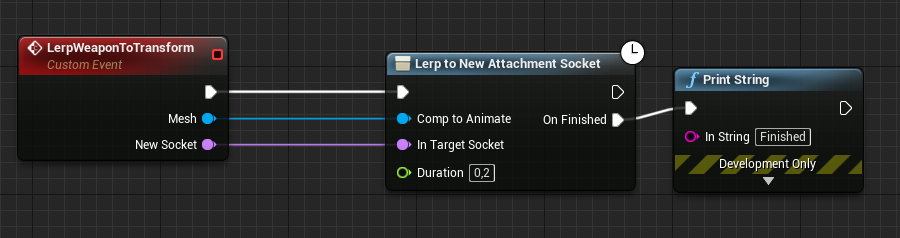
This node takes in a single scene component (a mesh for example) and a new socket name, and will automatically lerp the component to the new socket. The duration is configurable, so it’s very easy to test out different values. I found 0.2 to be a good value.
The code principles
To create an async Blueprint node, we create a class inheriting from UBlueprintAsyncActionBase. The general outline is as follows:
- Instantiate an object of the class using Blueprints
- Start a repeating process using the virtual Activate function
- The repeating process repeats until a goal is achieved
- Optionally broadcast a multicast delegate
- Mark the object as ready to be destroyed
We have to write two functions at the very least:
- The virtual Activate function has to be overridden and is responsible for initial setup and calculations. We need to call
RegisterWithGameInstanceto keep the object alive for as long as we need. Once it has served its purpose, we get rid of it viaSetReadyToDestroy. - A static BlueprintCallable creation function that instantiates and initializes the object. This is the function we actually call in Blueprints.
There is a very important reason why we aren’t using a timer. When lerping, we have to consider DeltaTime, as we don’t want frame rate to influence the speed at which we are lerping. We let our class inherit from a second class, FTickableGameObject. This gives us three additional virtual functions:
- Tick(float DeltaTime), gives us DeltaTime. A boolean determines whether Tick should run; we set it to true in Activate and back to false once finished.
- IsTickable(), returns that bool. This also excludes the Class Default Object (CDO) from being ticked.
- GetStatId(), must be implemented as the parent is pure. Use the macro
RETURN_QUICK_DECLARE_CYCLE_STAT(FTest, STATGROUP_Tickables).
Adding execution pins (optional)
To add execution (output) pins, we create multicast delegates (in Blueprint known as event dispatchers). They need to be multicast, as Blueprint only supports multicast delegates. Make them BlueprintAssignable. The pre-written graph node class iterates over all multicast delegate properties of the class to create new ‘then’ exec pins.
Returning the async task as object (optional)
You can expose the async task object by defining a UCLASS meta tag called ExposedAsyncProxy. This lets you specify the name of the output pin of the node:
UCLASS(meta = (ExposedAsyncProxy = LerpAsyncAction))
class YOURMODULE_API ULerpToNewAttachmentSocketProxy : public UBlueprintAsyncActionBase, public FTickableGameObject
The lerp
- Activate: We immediately attach the scene component to the new target socket and keep the world transform. This makes the scene component have the new socket transform as its origin while staying at the same spot. The target transform is now known because it becomes relative: 0,0,0 for location, 0,0,0 for rotation, 1,1,1 for scale. We get the starting transform in target space via
StartTransformRelative = SceneComponent->GetRelativeTransform();. - IsTickable: returns true once Activate set the bool.
- Tick: The actual lerp. We build our Alpha (CurrentDuration/Duration), clamp it between 0 and 1, and interpolate. After the specified duration the component will have the correct transform; then we fire the OnFinished delegate.
The code
Header:
DECLARE_DYNAMIC_MULTICAST_DELEGATE(FOnFinished);
DECLARE_DYNAMIC_MULTICAST_DELEGATE(FOnUpdated);

UCLASS(meta = (ExposedAsyncProxy = LerpAsyncAction))
class YOURMODULE_API ULerpToNewAttachmentSocketProxy : public UBlueprintAsyncActionBase, public FTickableGameObject
{
public:
    virtual void Tick(float DeltaTime) override;
    virtual TStatId GetStatId() const override;
    virtual bool IsTickable() const override;
private:
    GENERATED_BODY()

public:
    UPROPERTY(BlueprintAssignable)
    FOnFinished OnFinished;

    UPROPERTY(BlueprintAssignable)
    FOnUpdated OnUpdated;

    UPROPERTY()
    USceneComponent* SceneComponent = nullptr;
    UPROPERTY()
    FName TargetSocket;

    virtual void Activate() override;

    UFUNCTION(BlueprintCallable, meta = (BlueprintInternalUseOnly = "true"), Category = "Flow Control")
    static ULerpToNewAttachmentSocketProxy* LerpToNewAttachmentSocket(USceneComponent* CompToAnimate, FName InTargetSocket, float Duration);

    UFUNCTION(BlueprintCallable, meta = (BlueprintInternalUseOnly = "true"))
    void DrawDebugLocation(float Radius = 10.f, FLinearColor Color = FLinearColor::Red, float DrawDuration = 0.1f);

private:
    bool bShouldTick = false;
    float Duration;
    float CurrentDuration = 0;
    FTransform StartTransformRelative;
};
Cpp:
ULerpToNewAttachmentSocketProxy* ULerpToNewAttachmentSocketProxy::LerpToNewAttachmentSocket(USceneComponent* CompToAnimate, FName TargetSocket, float Duration)
{
    ULerpToNewAttachmentSocketProxy* LerpProxy = NewObject<ULerpToNewAttachmentSocketProxy>();
    LerpProxy->SetFlags(RF_StrongRefOnFrame);

    LerpProxy->Duration = Duration;
    LerpProxy->SceneComponent = CompToAnimate;
    LerpProxy->TargetSocket = TargetSocket;

    return LerpProxy;
}

TStatId ULerpToNewAttachmentSocketProxy::GetStatId() const
{
    RETURN_QUICK_DECLARE_CYCLE_STAT(FTest, STATGROUP_Tickables);
}

bool ULerpToNewAttachmentSocketProxy::IsTickable() const
{
    return bShouldTick;
}

void ULerpToNewAttachmentSocketProxy::Activate()
{
    RegisterWithGameInstance(SceneComponent);
    bShouldTick = true;

    // immediately attach to the new target socket; KeepWorldTransform so the component doesn't snap
    SceneComponent->AttachToComponent(SceneComponent->GetAttachParent(), FAttachmentTransformRules::KeepWorldTransform, TargetSocket);
    StartTransformRelative = SceneComponent->GetRelativeTransform();
}

void ULerpToNewAttachmentSocketProxy::Tick(float DeltaTime)
{
    float Alpha = FMath::Clamp<float>(CurrentDuration / Duration, 0, 1);

    const FTransform NewTransformInRelative = UKismetMathLibrary::TLerp(StartTransformRelative, FTransform(), Alpha, ELerpInterpolationMode::DualQuatInterp);
    SceneComponent->SetRelativeLocationAndRotation(NewTransformInRelative.GetLocation(), NewTransformInRelative.GetRotation());

    CurrentDuration += DeltaTime;
    OnUpdated.Broadcast();

    if (CurrentDuration >= Duration)
    {
        bShouldTick = false;
        OnFinished.Broadcast();
        SetReadyToDestroy();
    }
}

void ULerpToNewAttachmentSocketProxy::DrawDebugLocation(float Radius, FLinearColor Color, float DrawDuration)
{
    UKismetSystemLibrary::DrawDebugSphere(SceneComponent, SceneComponent->GetComponentLocation(), Radius, 12, Color, DrawDuration);
}